Every feature. Every claim. Wired in the app.
This is the full catalog. Every section below ties back to a real module in the running EVE app. Nothing is a slide.
The Lens — One Chart Engine, Every Surface.
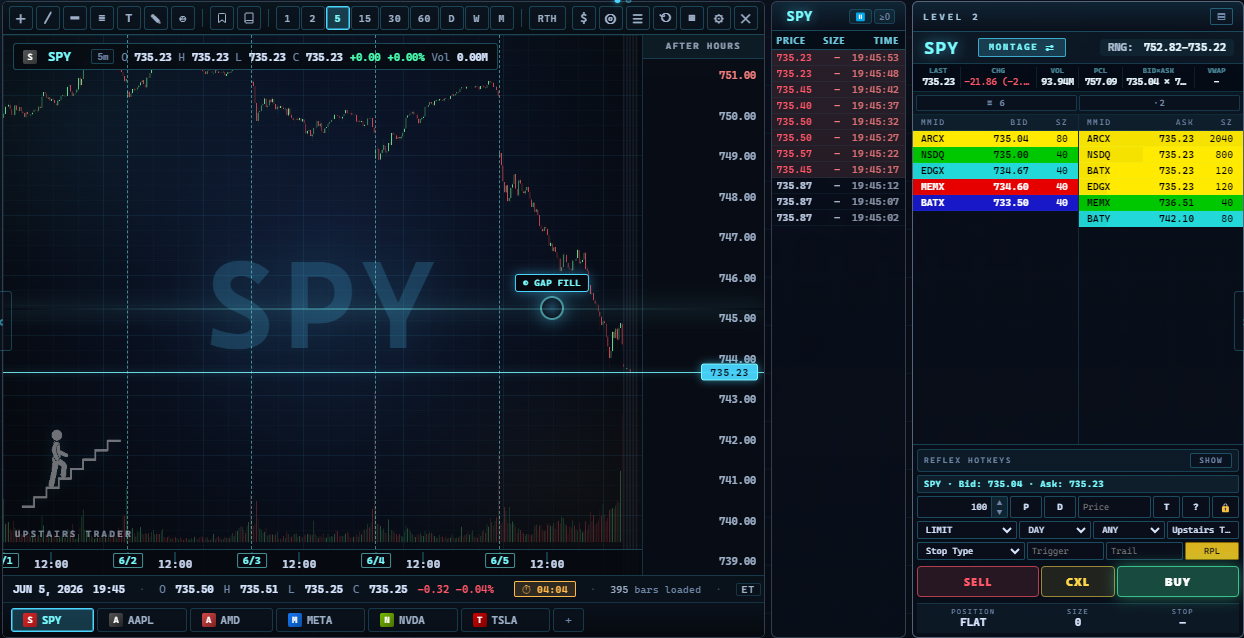
One proprietary chart powers every chart surface — main view, popup, journal modal, calendar day-recall. Same look, same speed, same controls.
- Nine timeframes — 1m, 2m, 5m, 15m, 30m, 60m, Daily, Weekly, Monthly. Remembered per symbol.
- Today's view default with RTH/EXT toggle and pre-market shading.
- MA20 + MA200 overlays, HOD/LOD persistent labels, last-price line, cyan glow chip.
- Crosshair OHLCV strip + bottom info bar with countdown to next candle close.
- Zoom + pan with mouse wheel, pinch, keyboard, click-drag, shift-drag box zoom.
- Drawings travel across timeframes for the same symbol.
- Six drawing tools — trendline, horizontal, 7-ratio Fibonacci, text, measure, chart alert.
- Indicators — VWAP, EMA 9/20/50/200, RSI, MACD, Bollinger.
- Reference lines — PMH, PML, YH, YL, YC on one button.
- NYSE holiday calendar baked in.
- Right-click context menu aware of what's under the cursor.
- Glass-frame chart variant for popups on calendar, journal, blotter.
- Execution markers — entry triangle below the bar, exit triangle above. Jade for wins, red for losses.
- Per-tab state — every ticker stays the way you set it up.
- Symbol tabs + company logos, browser-style, with auto-resolve.
EVE annotation layer — cinematic chart commentary
Pulse rings + sonar pings
EVE draws on the chart as she talks. Cyan rings expand from price levels. Auto-fade.
Slide-in arrows with labels
Voice tool-wired. Transcript triggers read her speech for price mentions and fire the matching annotation.
Breathing zones + spotlights
Translucent regions and vignette spotlights when EVE has something to show.
Callout bubbles
Anchored to the bar, written in plain English.
Position visualization
Entry · stop · target
Solid blue entry, dashed red stop, dashed green target. Translucent profit zone shows progress.
Draggable P&L tile
Symbol, side, shares, R-multiple, $ P&L, % P&L. Focus Mode hides the dollars.
Chart event popups
Every signal that fires opens a small popup with the plain-English read.
P&L Scale (ladder)
Toggleable labels along the right axis show projected $ P&L at every price. Cycles dollars / percent / both / off.
Market Data — L2, Time & Sales, Watchlist, Chain, News, Pulse.
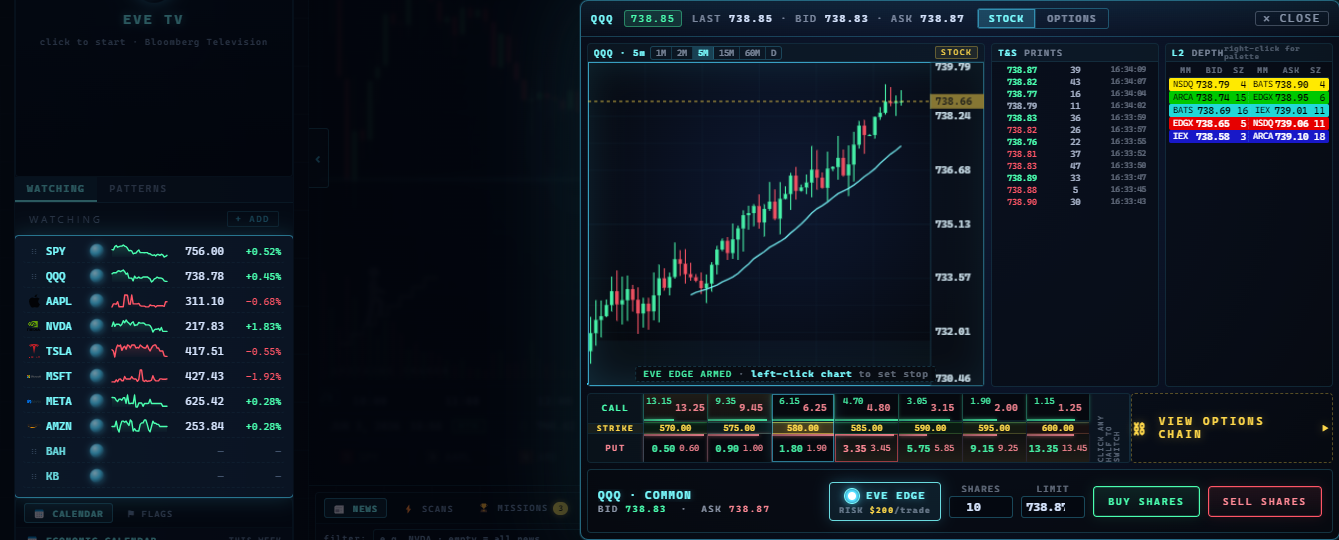
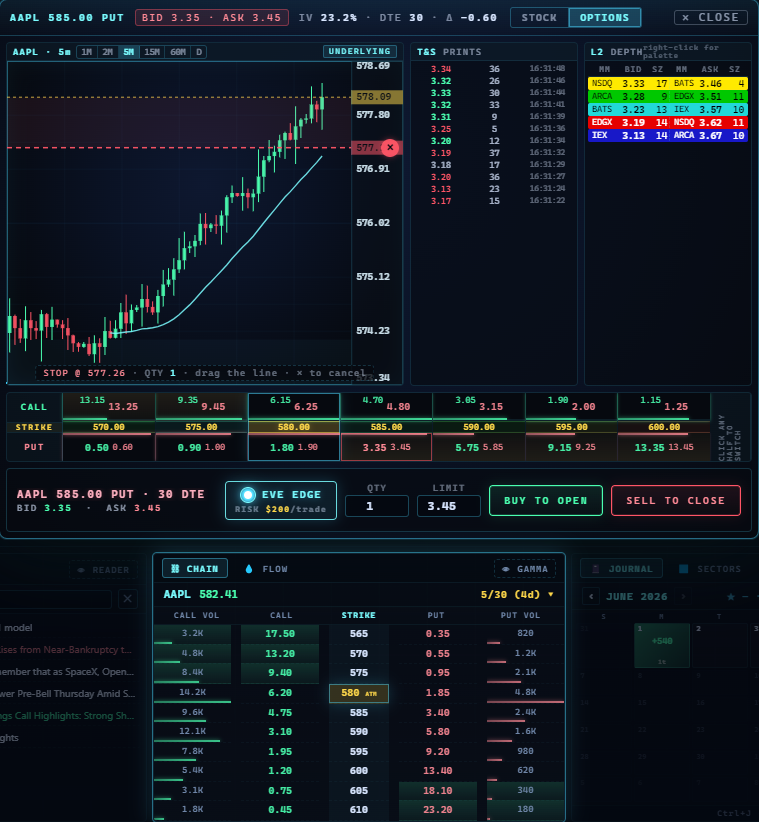
Level 2
Montage view
Classic bid/ask stack with MMID, price, size columns.
Ladder view
Centered price ladder with heat-map. Click a price to half-build the order.
Cockpit action row
Red sells. Green buys. Yellow cancels. Always. Theme cannot override these safety colors.
REFLEX presets
User-defined preset quantity buttons for one-click sizing.
Persistent lock + iceberg
Lock protects your size. Display button shows iceberg active/inactive.
Time & Sales + Watchlist
Every print
No aggregation. Bid/ask hit coloring. PRICE / SIZE / TIME columns.
Inline flash treatments
T&S rows flare on big-print or sweep. L2 rows pulse on iceberg or spoof. Blotter rows flash on P&L milestones.
THE HAWK
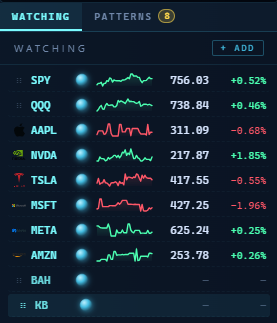
Up to 20 symbols streamed in parallel. The anomaly engine runs on every name. 30-second re-sync.
Patterns tab
Live feed of every pattern that fires across the watchlist. Click a row to jump to that chart at that bar.
News + Market Pulse
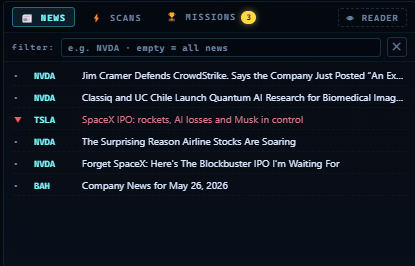
News ticker
Headline feed across the bottom. Click a headline to open a clean reader.
Market pulse cells
New highs vs lows, advance/decline, FedWatch read, put/call ratio. Each cell explains itself on hover.
Connection-health pips
Pips show feed freshness tick by tick — chart, L2, T&S, account, broker.
Feed picker
Schwab live · Yahoo 15-min delayed · synthetic offline. One click.
Linkage
- Panel-link symbol sync — type a new symbol on any panel, every panel follows.
- Scroll-to-adjust on every number — entry, stop, target, strike, limit. Shift for bigger steps.
- Confluence view — when a signal fires, the chart bar, matching L2 rows, and matching T&S prints all light up the same color, same beat.
The Pit — Premium Selling, Mechanical.
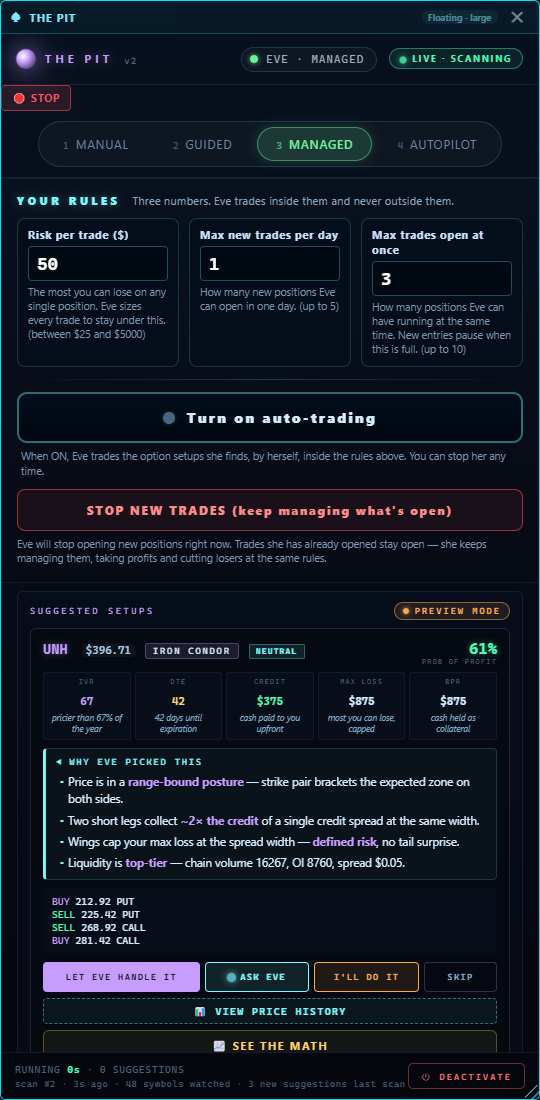
Builds the universe, runs the filter chain, surfaces only the setups that cleared every gate. Discipline is the edge.
- IVR ≥ 50 — only when the premium pays you for the risk.
- 30-60 DTE filter targeting ~45 days — the window where time decay actually pays.
- Earnings exclusion — names with earnings inside the trade window get cut.
- 1 standard deviation strikes — probability math built in, not eyeballed.
- 50% profit take OR 21 DTE exit — whichever fires first. Two exits. Non-negotiable.
- Defined-risk default — iron condors + credit spreads. Undefined-risk requires explicit opt-in.
- Dynamic universe — ~100-150 eligible names refreshed weekly. ~10-25 actionable daily.
- Pit settings panel — three knobs (IVR threshold, DTE range, max positions) plus a per-engine kill switch.
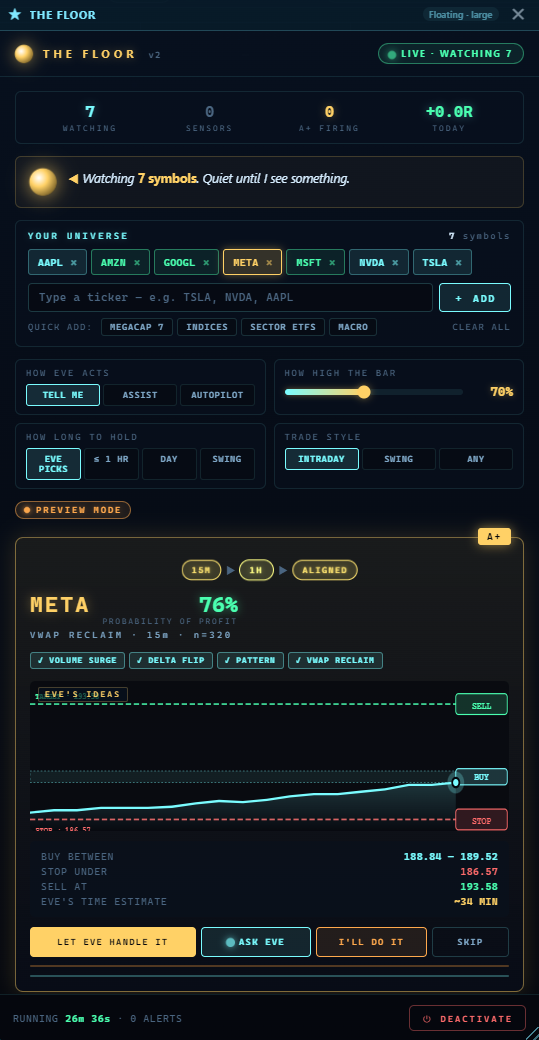
The Floor — Intraday Confluence.
The intraday equity engine — gappers, runners, breakouts, reclaims. Surfaces signals that clear a confluence gate.
Eight scanners
Premarket gappers
Overnight movers ranked by gap size and overnight volume.
Opening range
First 15-minute range breaks with directional bias.
Squeeze breakout
Compression resolutions on the intraday charts.
Unusual volume
Relative-volume spikes against the 20-day baseline.
VWAP reclaim
Recoveries through the volume-weighted average price.
Yesterday break
Breaks of yesterday's high or low.
52-week break
New 52-week highs or lows.
Confluence
Multi-scanner agreement — the strongest reads in the room.
- ≥70% confluence gate — only the high-conviction signals get through.
- Narration line — each signal arrives with EVE's plain-English read of what fired and why.
- Glass popup on click — chart with the signal lit, narration anchored beside.
- Floor backtest + preview — replay recent signals before turning the engine on.
The Hill — When Smart Money Moves, You See It.
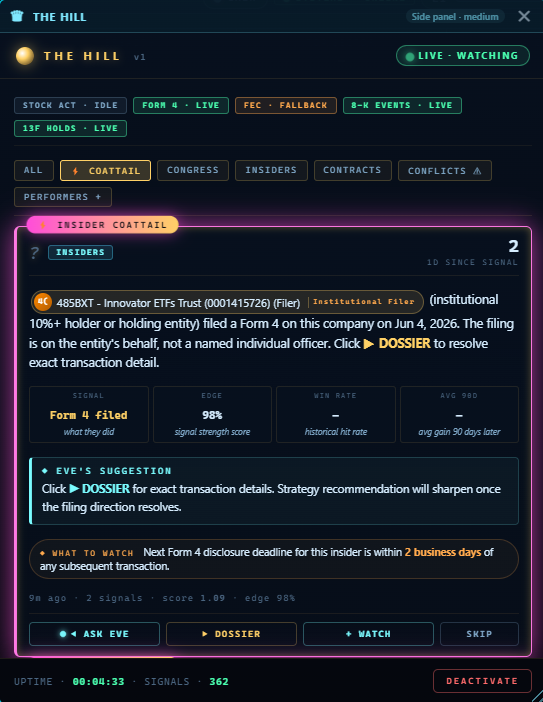
Five public-record sources fused into one feed of person-cards with timelines, holdings, and coattail picks.
Five sources
Lawmaker trades
When a lawmaker buys, you see it. Public filings.
Insider Form 4
When the CEO buys, you see it.
Institutional 13F
What the big funds bought last quarter.
Material 8-K events
The events the SEC says investors must know.
Federal contracts ($1M+)
When the government writes a check, the contractor's stock can move.
- Coattail picks — see who else trades the same name the tracked person trades.
- Person identity matching — resolves names across sources via a public knowledge graph.
- Filter chips — source, time window, ticker, sector.
- Hill backtest — replay recent signals against price history.
Pattern Recognition + Anomaly Engine.
A central detector framework with 27 detectors plus a candlestick engine. Every detector fires a plain-English event into the EVE SAW feed and onto the chart. The pop-up below is the actual in-app event card.
Anomaly Highlights (9)
- Big print on T&S (≥8× median size) · new HOD break · new LOD break · iceberg / hidden refill · P&L cross-zero · target hit · stop touched · spoofing · hidden liquidity inference
Risk Shield (6)
- Oversize warning · FOMO chase · daily loss cap (75/90/100%) · revenge trade (re-entry under 60s) · R-multiple drift · saturation (over 8-trade default)
Smart Money (6)
- L2 imbalance · unusual options activity · sweep / block prints · sector rotation · RVOL spike · index divergence
Pattern Reader (6, multi-timeframe)
- VWAP reclaim · ORB break · bull/bear flag on 1m/5m/15m/1h/Daily · gap fill imminent · key level test · trend-line break multi-TF
Candlestick engine (9 patterns)
- Doji · hammer · star · marubozu · engulfing · inverse hammer · gravestone · three soldiers · three crows. Each ships with its teaching surface.
EVE SAW feed
- Floating top-right toast stack + persistent log + collapsed badge with live count.
- Hawk pill shows how many symbols are scanning.
- Toast symbol click switches the main chart.
- Anomaly flash — chart, L2, and tape flash a synchronized color for a beat.
- Click-to-drill — pattern tile → chart jumps, L2 + T&S light up the matching depth.
EVE's Edge — The Edge Is a Sentence.
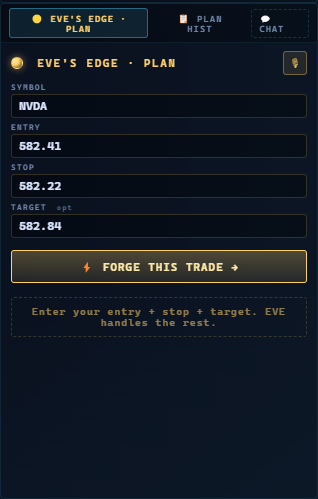
EVE reads your saved trades and the live tape, then forges a personalized edge profile. She only fires when those conditions show up.
- Edge Wizard — three steps, plain language. EVE returns the rule you actually trade.
- Edge widget wraps entry, stop, target, size and a one-tap submit around your live edge read.
- Edge auto-fire — when the live tape matches your saved condition, the widget pre-stages the ticket.
- PLAN HIST writeback — every fired plan writes back to journal history with conditions, outcome, R-multiple.
Smart Journal — Calendar, Recall, Coaching, Export.
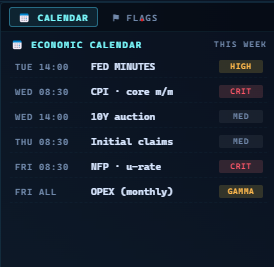
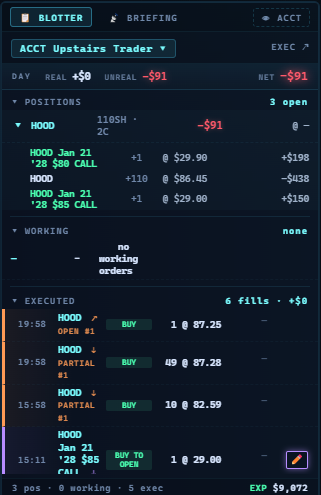
Calendar + recall
- Smart Journal calendar — every day shows P&L color, trade count, round-trip stripes.
- Round-trip color stripes — green for winning round-trips, red for losing ones.
- Day-recall glass popup — trades, stats, canonical chart with execution markers, EVE's read on the session.
- Real chart in journal modal — every entry mounts the canonical chart. Zoom, pan, hover, draw — all of it.
- Trade timeline + notes — entry, scales, exit, plus a notes box per trade.
- Photo attach per trade — chart screenshot, setup photo, anything.
Coaching
18-rule coaching library
Revenge, oversize, FOMO chase, add-to-loser, cold open, hold-into-close, loss-cap-hit, and more. Each fires before the next click.
THE COMPACT
The sacred contract between operator and EVE. EVE WATCHING pill engages / releases EVE per-trade.
ENFORCING mode
EVE auto-snaps widened stops back. Verbal override required to break the plan.
First-evening hook
After the first day, EVE asks one question: "What's one thing you noticed today?"
Export
- PDF tax export with a Schedule-D friendly capital-gains summary on the cover page.
- CSV · JSON · Markdown · broker-import — your data, your format.
- Five trader-type templates — day, swing, options, futures, mixed. Tags, columns, prompts included.
- Tag taxonomy — 62 default tags. Room to add 50 of your own.
Capture System — Built In.
A floating toolbar plus a camera icon on every panel header. No second app. The toolbar below is the actual in-app capture surface.
Floating capture toolbar
Record, screenshot, open folder, delete. Plus a camera icon on every panel header.
Four capture modes
App window · display · region · select-area. Drag a box. The clip is just that.
Screen recording
App, window, or whole desktop. With or without mic. With or without computer sound. 30 fps default.
3-2-1 countdown
Time to switch windows before record starts.
Open-in-folder + copy path
Right after a capture, one button opens the location, another copies the path.
Delete (Recycle Bin)
One-tap delete with safe undo via the OS Recycle Bin.
Dated folders
EVE Captures / Screenshots / YYYY-MM-DD / and Recordings / YYYY-MM-DD /.
Watermark · Free vs Pro
Free recordings get a small watermark. Pro recordings do not.
In-app capture library (Pro)
Gallery of recent screenshots and recordings inside the app.
Trim · attach · 120fps (Pro)
Trim start/end. One-tap attach to today's journal. 120 fps mode.