How to use the platform.
From the moment you install through your first study-mode trade. Ten short stops. Read it in three minutes. Walk it in fifteen.
First launch.
You open EVE and the first thing you see is dark space, a soft grid, and one quiet orb in the center. No popups. No tour. No twenty windows fighting for attention. It is built to feel calm because trading is loud enough already.
Open the app and just sit for ten seconds before clicking anything. That pause is the whole point.
The Stage.
The Stage is your trading workspace. Chart on the left, order book and tape on the right, watchlist underneath. Every panel is a tool you actually use, not a screen full of stuff to impress you.
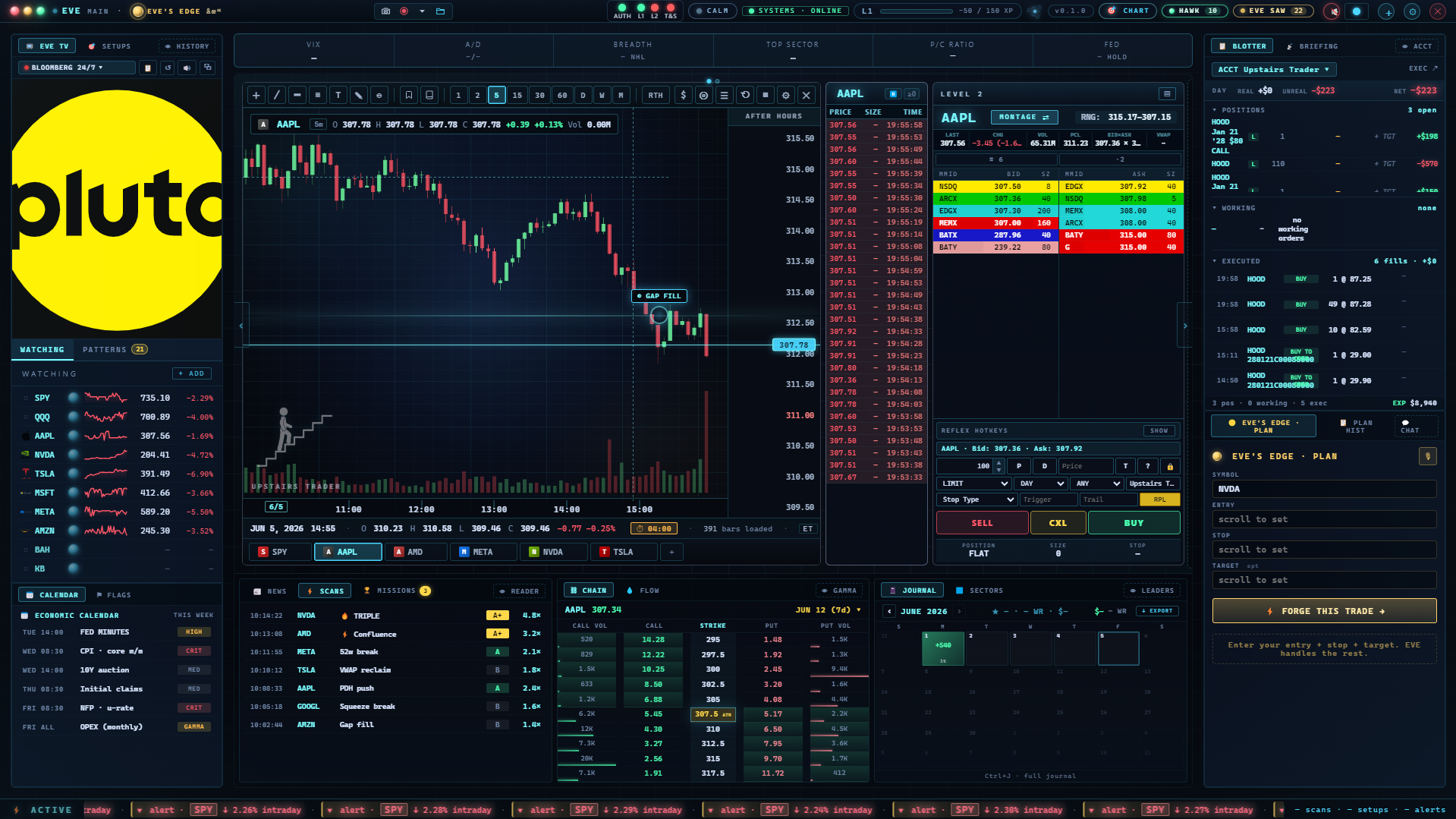
Drag a panel edge to resize it. Build the layout that fits your eyes, not somebody else's.
The orb.
The orb is EVE. It glows blue when she is calm, amber when something needs your eyes, red when she is telling you to stop. Click it to talk to her. Click anywhere else to dismiss her.
Click the orb once. Ask her what she sees in your current chart.
The chart.
Type a ticker in the chart's top bar to load it. Pick a timeframe with the row of buttons next to it. Hold a click on the chart and drag to draw a trendline you can keep.
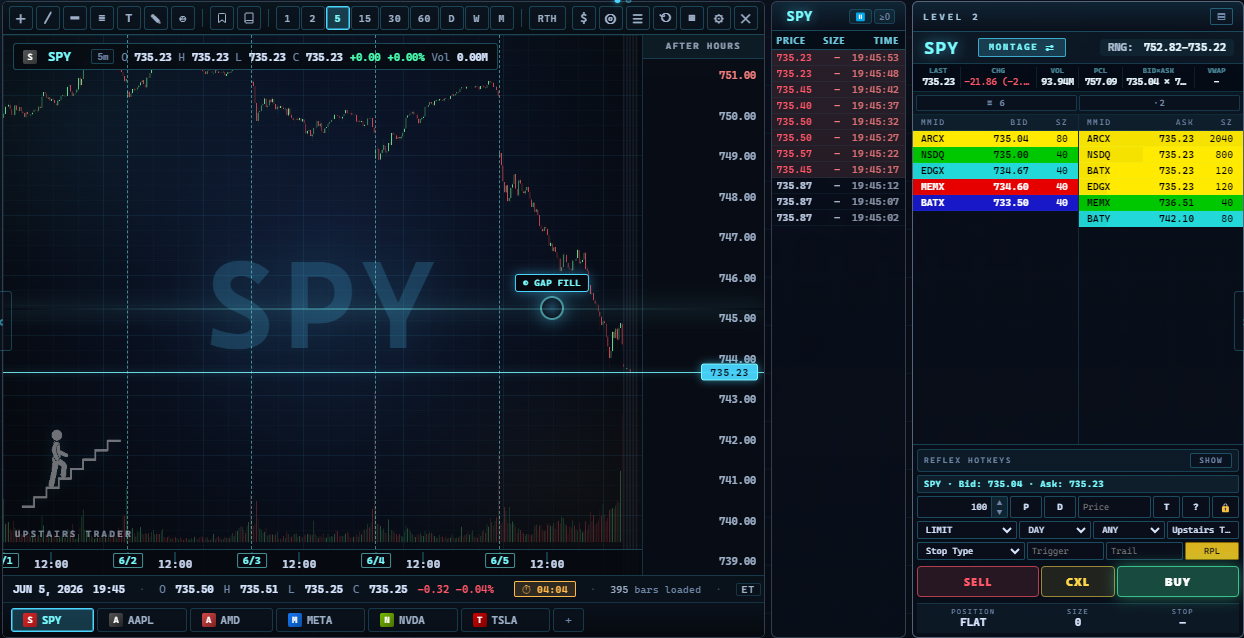
Load one ticker you actually care about. Draw one line at the level you would defend. That line is your plan.
Level 2.
Level 2 shows the orders waiting to buy and sell at each price. Green is bids, red is offers. The bigger the row, the bigger the size sitting there. It tells you where the wall is before price gets to it.
Watch one ticker on Level 2 for two minutes. Notice which side is stacking and which side is pulling.
Time and Sales.
Time and Sales is the live tape. Every trade that prints shows up here in order, with price, size, and time. Green means a buyer paid up. Red means a seller hit the bid. This is the truth of who is in control right now.
Mute everything else and read the tape for one minute. Speed and color tell you more than any indicator.
The watchlist.
The watchlist is your short list of names worth watching. Each row shows the symbol, last price, change, and a small sparkline for the day's shape. Add a name with the plus button. Drag to reorder.
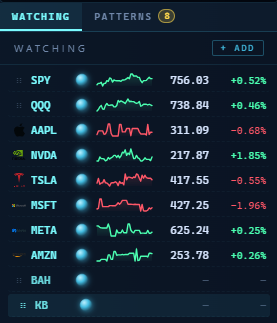
Trim your watchlist to five names. If you cannot defend why a name is on it, take it off.
Your first study-mode trade.
Study mode lets you place a trade with no real money on the line. Pick the ticker, the side, the size, and the stop. Hit submit. The trade tracks like a real one so you can practice the motion without paying tuition.
Place one study trade today. Set a real stop. Walk away and let it work.
Reading the trade card.
The trade card shows entry price, current price, size, stop, target, and live profit or loss. It also shows the time you took it and the reason you typed in. Every field is there so future you can review it without guessing.
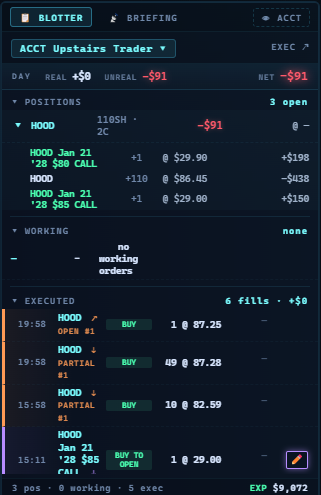
Before you submit a trade, fill the reason field in one sentence. If you cannot write the reason, you do not have one.
EVE's voice.
EVE has a voice. She is off by default. Turn her on in settings and pick when she speaks: entries, exits, stops, or all three. She is terse on purpose. She is a coach, not a cheerleader.
Turn EVE's voice on for stops only. The first time she calls one, listen.
You've seen the room. Now stand in it.
Open the app. The orb is waiting. Walk through these sections with the screen in front of you and you'll know the platform by the end of the hour.
Open the app →